
Google has significantly reduced the free storage tier for new accounts to a mere five gigabytes, creating an immediate bottleneck for shared data. This transition marks a fundamental shift in how the Android operating system interacts with the cloud, moving away from a model that once prioritized seamless synchronization without strict accounting of system-level information. In previous iterations of the platform, essential data such as call logs, Wi-Fi passwords, and device settings were largely excluded from the primary storage quotas that users shared across Drive and Photos. However, the new unified storage architecture ensures that every single byte of data generated by a device now contributes to a consolidated cap. This change forces users to re-evaluate their digital footprint and recognize that even small system backups can have a cumulative effect on their available space. As the boundaries between system data and personal content continue to blur, maintaining a free account has become a delicate balancing act for the average smartphone owner.
Navigating the Technical Shifts
Granular Controls: Managing Active Backups
To assist users in navigating these tighter restrictions, the Android interface now includes highly specific management tools designed to offer granular control over cloud synchronization. Rather than providing a simplistic all-or-nothing approach to data safety, the current settings menu allows for a customized experience where individuals can pick and choose which data categories deserve space in the cloud. For example, a professional might prioritize the preservation of vital text messages and contact information while opting to disable the backup of less critical data like call history or specific application configurations that can be manually restored. This surgical approach to data management is essential for staying within the five-gigabyte limit, especially as modern applications grow in complexity and the metadata they generate becomes increasingly bloated. By providing these specific toggles, the system empowers users to curate their digital archives, though it requires a higher level of manual intervention than in previous years.
Beyond simple system settings, the granular controls now extend to individual application data, allowing users to prevent specific high-volume apps from syncing while keeping others active. This is particularly relevant for messaging platforms that store large media files or databases locally, as these can quickly overwhelm the five-gigabyte limit if left unchecked. By accessing the backup settings, users can view a breakdown of how much space each application is projected to occupy on the cloud, providing the transparency needed to make informed decisions about data preservation. This level of oversight was once reserved for advanced users, but it has become a necessary component of the standard Android user experience in 2026. Moreover, the system now provides automated suggestions for which data sets might be safely excluded based on usage patterns. This ensures that even less tech-savvy individuals can optimize their storage without accidentally deleting essential information, maintaining a functional balance.
Storage Recovery: Utilizing the Account Dashboard
It is important to emphasize that simply toggling these backup features to the off position within the device settings does not automatically remove existing data from the cloud servers. To effectively reclaim storage space and see an immediate reduction in a used quota, users must navigate to the comprehensive Google Account Dashboard to manually purge outdated or unnecessary backup files. This distinction is a frequent source of confusion for those who find themselves hitting their storage ceiling despite having disabled active synchronization on their current handset. Without taking this extra step to clear out legacy data from older devices or previous system versions, the storage remains occupied, potentially blocking the delivery of new emails or the synchronization of recent photos. Mastering this two-step process—curating active backups while cleaning up historical data—has become a mandatory skill for those wishing to avoid recurring subscription fees. Consequently, the burden of data hygiene has shifted from the provider to the user.
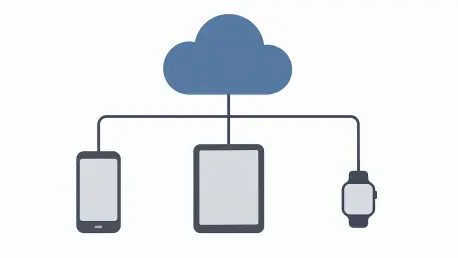
The account dashboard also serves as a critical hub for managing backups from multiple devices, a feature that has become increasingly vital as users often own tablets, secondary phones, and smart wearables. In this unified storage environment, a backup from an old device that was replaced years ago can silently consume a significant portion of the shared five-gigabyte quota. The dashboard allows for the identification and removal of these legacy snapshots, which are often no longer needed but remain stored by default. This centralized management system provides a clear visual representation of where every megabyte is allocated, from Gmail attachments to specific device configuration files. By regularly auditing this dashboard, users can prevent the slow accumulation of digital clutter that eventually leads to service interruptions. This proactive maintenance is the only reliable way to ensure that the primary account remains active and capable of receiving new data. It represents a shift toward a more intentional form of digital ownership.
Evaluating the Impact: User Experience
Risk Assessment: Balancing Convenience and Safety
The shift toward a unified storage cap presents a difficult trade-off between the convenience of automated backups and the long-term costs of digital maintenance. When users decide to disable cloud synchronization to save on storage space, they inadvertently embrace a clean slate effect that becomes painfully apparent during subsequent device upgrades. Without a cloud-based backup, the process of moving to a new phone requires the manual re-installation of every application and the painstaking reconfiguration of personal settings that were once handled automatically. Furthermore, the absence of a cloud-based safety net leaves local data, such as private messages and locally stored documents, highly vulnerable to unforeseen hardware failures, physical loss, or theft. For many, the risk of losing years of digital history outweighs the monetary savings of a free account, yet the five-gigabyte limit often proves insufficient for even basic protection. This creates a friction point where the user must decide if their data is worth the monthly premium.
In response to these storage constraints, some users have turned to local backup solutions, such as physical storage media or personal network-attached storage devices, to safeguard their information. While these methods avoid the recurring costs of a cloud subscription, they lack the seamless, automated background processing that makes cloud-based Android backups so effective. Manually transferring files to a computer or an external drive requires a level of consistency and discipline that many find difficult to maintain over the long term. Furthermore, local backups do not offer the same geographic redundancy as cloud servers; if a physical disaster occurs at home, both the primary device and the local backup could be lost simultaneously. This highlights the inherent value of the cloud as a disaster recovery tool, even as its accessibility becomes more restricted. The tension between the security of off-site storage and the rising costs of maintaining it remains a central challenge for users who must prioritize only their most irreplaceable memories.
Ecosystem Evolution: Subscriptions and Next Steps
As users reached their storage thresholds, the immediate and disruptive consequences became clear when Gmail accounts stopped receiving incoming mail and photo libraries ceased to sync across devices. This reality successfully pushed a significant portion of the user base toward the Google One subscription model, which offered expanded storage tiers and integrated advanced artificial intelligence features for better data organization. While third-party cloud alternatives remained available for those seeking to avoid total ecosystem lock-in, they often failed to provide the same level of seamless integration that defined the modern Android experience. Looking ahead, the strategy centered on encouraging users to treat their cloud storage as a premium resource rather than an infinite utility. Future developments likely involved more aggressive compression algorithms and predictive tools that helped individuals identify and delete redundant files before they reached their limits. Ultimately, the transition solidified the concept that digital space was a finite asset that required proactive management.
To address these ongoing challenges, the tech industry began developing more efficient data formats and hybrid storage models that combined local processing with minimal cloud footprints. Users were encouraged to adopt more disciplined digital habits, such as the routine deletion of large email attachments and the use of lower-resolution photo uploads where appropriate. Looking toward the future of the platform, the emphasis shifted toward providing actionable insights through intelligent storage assistants that automatically flagged redundant or low-quality data for removal. These tools allowed individuals to maintain a functional digital presence without necessarily upgrading to the highest-paid storage tiers immediately. The transition served as a catalyst for a broader conversation about the sustainability of free services in an age of exploding data generation. Ultimately, the changes to Android backups demonstrated that while the cloud remained a powerful tool, its role was evolving into a carefully managed resource that required a strategic approach.