
Unlocking the full potential of a powerful local Model Context Protocol server often hinges on a single, transformative step: breaking it free from the confines of local machine communication to make it accessible across the global web. Many valuable server applications are designed to communicate through standard input and output (stdio), a method that restricts their use to the machine they run on. However, this limitation is not a permanent barrier. By creating a simple yet robust bridge, it is possible to transform that local-only tool into a globally accessible web API, opening a new world of integration possibilities.
From Local-Only to Globally Accessible An Introduction
The central goal is to evolve a local MCP server from an isolated process into a public web service that can be consumed by any internet-connected application. This transformation adds immense value by enabling remote clients, such as web frontends, mobile apps, or third-party services, to interact with the server’s logic without needing direct access to the host machine. This is not just a convenience but a fundamental architectural improvement.
Achieving this evolution involves a clear and methodical approach. The process leverages a small set of powerful technologies to create a communication bridge. An Express.js application serves as the core intermediary, translating standard HTTP requests into the stdio commands the MCP server understands. To expose this local bridge to the public internet during development and testing, a tunneling service like ngrok provides a secure and straightforward solution, creating a public URL that forwards traffic directly to the local machine.
The Strategic Advantage Why Expose Your MCP Server
The most significant benefit of this architecture is universal accessibility. By exposing the MCP server through a standard web API, the underlying logic becomes available to developers working in any programming language or framework. As long as a client can make an HTTP request, it can integrate with the server. This language-agnostic approach removes significant barriers to adoption and collaboration, allowing diverse teams to build on a common backend.
Furthermore, this model centralizes server management and promotes operational efficiency. Instead of deploying and maintaining separate instances of the MCP server for different applications, a single, powerful instance can serve multiple clients. This simplifies updates, monitoring, and resource allocation. It also streamlines client-side development, as complex computational logic is offloaded to the centralized server, allowing client applications to remain lightweight and focused on the user experience.
The Implementation Guide Building Your API Bridge
Understanding the Core Architecture
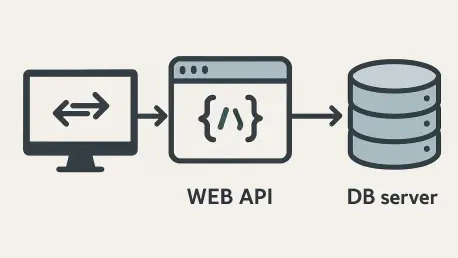
The design pattern at the heart of this solution is an intermediary service. The Express.js server functions as a protocol translator, sitting between the public internet and the local MCP process. It receives standard, well-understood HTTP requests and converts them into the specific JSON-RPC format communicated over stdio pipes that the MCP server expects. This layer of abstraction is the key to decoupling the server’s core logic from the way clients interact with it.
The journey of a single request illustrates this flow clearly. An internet client sends an HTTP request to a public URL generated by ngrok. Ngrok securely tunnels this request to the Express.js server running on the local machine. The Express server then sends the processed command to the MCP server’s stdin, awaits the result from its stdout, and packages that result into an HTTP response. Finally, this response travels back through the ngrok tunnel to the original client, completing the communication cycle seamlessly.
Building the Expressjs Wrapper
The implementation begins with a Node.js script, typically named server.js, that acts as the API wrapper. This script has two primary responsibilities: first, it spawns the MCP server as a child process, giving it programmatic control over the server’s lifecycle and communication streams. Second, it starts an Express.js web server that listens for incoming HTTP requests on a specific port, creating an endpoint that will trigger interactions with the MCP process.
Within this script, the core logic involves handling POST requests, which are ideal for sending complex data like JSON-RPC messages. Upon receiving a request, the Express route handler extracts the body, formats it into the precise message structure required by the MCP server, and writes it directly to the child process’s stdin. Simultaneously, it listens for data on the process’s stdout stream. When the MCP server responds, the script captures this output, parses it, and sends it back to the client as the HTTP response.
It is crucial to recognize that any generic code serves only as a template. To make it functional, several sections must be customized to match the specific MCP server being wrapped. The spawn command must be updated with the correct executable and arguments to start the server. The request message format must be tailored to the exact JSON structure the server anticipates. Likewise, the logic for parsing the response data and identifying errors must be adjusted to align with the server’s specific output conventions.
Setup Testing and Verification
Putting the API bridge into operation requires a few straightforward setup steps. The first prerequisite is installing the necessary Node.js dependencies, primarily the express framework, which can be done with a simple package manager command. With the dependencies in place, the service is launched by running two commands in separate terminal windows: one to start the ngrok tunnel and expose a local port to the internet, and another to execute the server.js script, which starts the API bridge itself.
With the service running, thorough testing is essential to verify its functionality and global accessibility. The public URL provided by ngrok can be tested using a variety of clients. A simple cURL command is an effective way to send a POST request from the command line and inspect the raw response. For a more interactive test, a JavaScript fetch call can be executed within a web browser’s developer console. Finally, accessing the endpoint from a mobile device connected to a different network confirms that the API is truly live and reachable from anywhere on the internet.
From Development to Deployment Production Considerations
The architectural pattern of using an Express.js wrapper proved to be a remarkably effective method for exposing any stdio-based MCP server to the web. It successfully decoupled the core server logic from the public-facing transport layer, enabling broad integration capabilities. This approach demonstrated its power not only for development and prototyping with tools like ngrok but also as a solid foundation for a production-ready system.
Moving beyond the development phase required replacing the temporary ngrok tunnel with a more permanent and robust hosting solution. Options for this transition included deploying the application to a managed platform like Railway, which automates the build and deployment process from a code repository. Alternatively, a traditional Virtual Private Server (VPS) configured with a reverse proxy like NGINX offered more granular control. For container-based workflows, cloud-native solutions such as Cloud Run provided a scalable and resilient environment.
Finally, preparing the API for production use involved implementing several critical features to ensure security and reliability. Adding authentication and authorization layers was a necessary step to control access and protect the underlying server from unauthorized use. Implementing rate limiting helped prevent abuse and ensure fair usage for all clients. Furthermore, establishing comprehensive logging and monitoring provided essential visibility into the API’s performance and health, which was indispensable for maintaining a reliable service for all users.