
Vijay Raina has spent years helping enterprises turn scattered, unloved documentation into a living knowledge system. As a specialist in SaaS architecture, he’s led teams through everything from raw file ingestion to expert validation loops that feed IDEs and AI agents. In this conversation, he explains how to prioritize sources, set up guardrails, and design an ingestion pipeline that turns PDFs, wikis, images, and Office files into trustworthy Q&A—then gets that context into the tools where people actually work. Along the way, he shares a few battle scars and playbooks for scaling governance without slowing teams down.
Teams often struggle with siloed PDFs, docs, and wikis. How would you prioritize which sources to ingest first, what success metrics would you track in the first 30–60 days, and can you share an anecdote where early source selection dramatically changed downstream AI reliability?
Start where pain, not volume, is highest. In practice, I rank sources by frequency of “shoulder taps,” risk if someone gets it wrong, and freshness—Confluence spaces for critical services, policy pages tied to compliance, and the top PDFs that support on-call runbooks. In the early phase, I watch approval rates on auto-generated Q&A, time-to-validate, and how often reviewers send items back; those patterns tell you if chunking and tagging are landing. We had a case where pulling a single Confluence space of deployment guides—then validating it—cut escalations and stabilized AI answers almost overnight. The turning point was converting one long, static page into atomic pairs with a source link, so the AI stopped guessing and started citing.
An AI pipeline that chunks, cleans, and converts raw text into atomic Q&A pairs can shift work from authoring to validation. How would you tune chunking and tagging, set confidence thresholds, and structure SME review so most posts are “approve-or-tweak” rather than rewrites?
I tune chunking around decision boundaries: one Q per operational action, error, or policy, with context windows that carry prerequisites and caveats. Tags mirror how teams search—service name, environment, language, and incident tier—so auto-tagging feels natural, not academic. I set conservative confidence thresholds at first and route anything borderline to SMEs with a side-by-side diff and a link back to the source, so the action is “approve or nudge,” not rewrite. Because Ingestion pre-structures and scores content, SMEs, admins, and moderators can validate quickly; the emotional shift is real—reviewers feel like editors polishing a solid draft, not authors staring at a blank page.
When auto-tagging, mapping to users, and confidence scoring kick in, what guardrails prevent misattribution or overconfidence? Walk through a step-by-step triage flow, typical edge cases you’ve seen, and the metrics you use to prove governance works at scale.
Guardrails start with source-of-truth bindings: every Q&A carries a pointer back to the original page or file and inherits its permissions. I layer a triage flow: high-confidence items with unambiguous ownership go to the mapped maintainer; medium-confidence or cross-team content lands in a moderated queue; anything touching restricted tags is auto-held for admin review. Edge cases include duplicated pages across spaces, mixed-audience docs where public and internal guidance commingle, and images whose OCR lifts text without capturing meaning. Governance health shows up in stable approval rates, low re-open rates after publication, and audit trails that make it obvious who touched what and when; the goal is quiet dashboards, not flashy ones.
Drag-and-drop uploads and a POST /ingest/file API enable both lightweight and high-volume migrations. How do you decide between the two, what batching or rate limits matter, and what does an ideal CI/CD-style ingestion pipeline look like end to end?
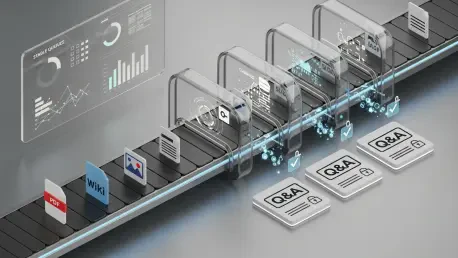
Drag-and-drop shines for curated bursts—think a team lead seeding a new space with a handful of PDFs or .docx files. The POST /ingest/file API is for steady, high-volume flows from build or export jobs across HTML, Markdown, images like .jpeg or .png, and Office documents like .xlsx and .pptx. I batch by logical topic boundaries so reviews cohere, and I gate submissions behind simple health checks—file type, size, and permission mapping—before the AI pipeline runs. In a CI/CD model, a change lands, a job exports the delta, hits the API, Ingestion converts to Q&A, reviewers get routed, approvals publish, and the MCP server surfaces the updates inside IDEs with zero human handoffs other than validation.
Many organizations rely on Confluence pages that are long and static. How do you convert those into maintainable Q&A pairs, preserve essential context, link back to the source, and avoid fragmentation or duplicate posts across spaces?
Use the Confluence Cloud connector to pull pages from select spaces, then slice them into Q&A that mirror user tasks—troubleshooting, provisioning, deployment sign-offs. Keep essential context in the answer—assumptions, versions, and gotchas—and always include the link back to the original page so readers can drill down. To avoid fragmentation, set a tagging canon per space and de-duplicate by title and source URL; near-duplicates are merged or redirected rather than published twice. The result is easier to discover and maintain at scale because each Q&A is atomic yet traceable to its canonical page.
Images and Office files are common but messy. How do you handle OCR for screenshots, diagrams, and scanned PDFs, capture alt text or captions, and ensure the extracted content yields accurate, searchable Q&A without losing the nuance of visuals?
Treat images as first-class inputs: run OCR, but pair it with structure extraction—captions, alt text, and callouts—so you keep the author’s intent. For diagrams, I generate Q&A that reference the labeled nodes or steps, then attach the image and cite the file so a human can reconcile the visual with the text. Scanned PDFs get a pass for layout artifacts, and anything with ambiguous arrows or color-coded meaning is flagged to reviewers with the image embedded. The litmus test is searchability without losing nuance: if the Q&A reads clearly and the linked visual fills in the subtleties, you’ve struck the balance.
Once Q&A posts are validated, teams want them in IDEs and AI tools via an MCP server. What does a robust integration rollout look like, how do you monitor retrieval quality and hallucination rates, and which developer workflows see the fastest lift?
Ship in concentric circles: enable the Stack Internal MCP server for a pilot repo, wire retrieval to respect space and tag permissions, and watch how suggestions show up during code reviews and incident fixes. I monitor citation coverage—answers should carry a source link—and compare before/after acceptance of AI suggestions; when the context is expert-vetted, hallucinations taper because the system has something real to quote. The fastest lift appears in on-call workflows and repetitive setup tasks, where a single reliable Q&A ends a thread of guesswork. Once the path is smooth, widen coverage to more repos and tools; the cadence should feel like a feature flag rollout, not a leap of faith.
To reduce “shoulder taps” on senior engineers, how would you operationalize expert routing, SLAs, and batching of reviews? Share metrics that show interruption costs dropping and describe a realistic reviewer workload at different company sizes.
Route by ownership first, interest second—map tags to maintainers and let volunteers subscribe to areas they care about. Batch reviews so experts handle related Q&A in one focused session, with SLAs tuned by risk; policy and security content gets a faster lane than low-impact how-tos. I look for fewer ad-hoc pings and smoother review cycles; when the queue empties routinely without fire drills, you’re paying down interruption debt. In small teams, one or two reviewers can clear daily batches; at scale, moderators absorb triage while SMEs only see items that truly need their judgment.
A monthly allowance of 100 approved Q&A pairs encourages careful curation. How would you allocate that budget across teams, decide what’s worth approving now versus later, and communicate trade-offs so stakeholders buy into the pacing?
Treat the 100 as a portfolio: reserve a core share for high-risk, high-traffic topics, then allocate the rest proportionally to teams based on demand. Approve items that unblock work or reduce escalation first, and park nice-to-haves in a backlog until they earn their place. I’m explicit about the trade: each approved Q&A is a durable asset that flows into IDEs and AI tools, so we choose impact over volume. Transparency helps—publish what was approved, what waited, and why—so stakeholders see pacing as stewardship, not scarcity.
Availability begins on April 29, 2026 for enterprise teams. What are the day-one steps in Admin Settings, which roles must be involved, and how do you run a 2-week pilot that surfaces gaps in tagging, permissions, and review capacity?
On day one, enable Ingestion in Admin Settings and connect the Confluence Cloud spaces you trust most. Bring in admins, moderators, and SMEs early so routing, tagging, and permissions align with how your org already works. Seed with a representative set of PDFs, HTML, Markdown, images like .png or .jpeg, and Office files like .docx or .xlsx, then watch the queues—approval rates and permission holds will reveal blind spots. Close the loop by pushing validated Q&A through the MCP server so the pilot exercises end-to-end reality, not a lab demo.
Continuous ingestion can drift from truth as systems change. How do you design revalidation cycles, sunset stale Q&A, and tie confidence scores to change events like code deploys or policy updates? Share a playbook with specific triggers and escalation paths.
I anchor revalidation to events: when a service deploys or a policy page changes, lower confidence on linked Q&A and re-route them to owners. Add time-based sweeps for content that hasn’t been touched while related sources have evolved, and sunset items that fail review with a redirect to the canonical page. Escalations kick in when ownership is unclear—moderators assign a temporary steward so nothing lingers in limbo. The texture you want is calm churn: items flow through, get refreshed, and return to a steady, high-confidence state.
Privacy and compliance are non-negotiable. How do you prevent sensitive data from being ingested, enforce space- or tag-level permissions, and audit who approved what? Describe the redaction process, sampling strategy, and the reports executives actually read.
Start with pre-ingest filters for known patterns and prohibited tags, then inherit permissions from the source so restricted spaces remain restricted. Redaction is surgical: mask secrets in the Q&A while preserving the logic of the answer and keep the original link for authorized users. I sample a slice of approved items across high-risk tags every cycle and verify citations, permissions, and reviewer notes. Executives read one page: approval volumes, hold reasons, and a clean audit of “who approved what and when,” with a spotlight on anything that required post-publication correction.
What is your forecast for AI-powered knowledge ingestion in enterprises?
We’re moving from sporadic, manual imports to continuous, expert-vetted streams that shape how people and agents work every hour. With releases like 2026.3 and availability on April 29, 2026, ingestion becomes a standard control plane—converting PDFs, HTML, Markdown, images (.jpeg, .jpg, .png, .bmp, .heif, .tiff), and Microsoft Office documents (.docx, .xlsx, .pptx) into living Q&A that tools actually trust. The MCP server will make “context in the IDE” feel as normal as code completion, and the monthly allowance of 100 approved Q&A pairs will push teams to curate with intent. The organizations that win won’t just ingest faster—they’ll close the loop faster, tying confidence to change, and letting their knowledge hum quietly in the background while people build.