
The most sophisticated artificial intelligence features within today’s mobile applications often operate with a peculiar form of tunnel vision, processing the world through a single sense and failing to grasp the rich, interconnected context a user naturally perceives. This limitation is not one of processing power but of architectural design, where an app’s ability to see remains disconnected from its ability to understand language or sense its environment. The next evolution in mobile AI will not be defined by a single, smarter model but by a cohesive system that allows these separate senses to collaborate, creating a truly intelligent user experience. Breaking free from these digital silos is the paramount challenge for developers aiming to build the next generation of assistive, intuitive, and contextually aware applications.
Beyond a Single Sense: The Untapped Intelligence in Your User’s Pocket
Many current AI-powered applications function like specialists in a world that demands generalists. A camera app excels at object detection but is oblivious to a user’s spoken query, while a voice assistant can parse a command but cannot see the physical object being referenced. This single-modal approach creates a fragmented experience that forces users to bridge the cognitive gap between what the app can do and what they actually need. The result is a series of powerful yet disconnected tools, rather than a single, coherent intelligence that understands the user’s world as a whole.
The true leap forward in mobile AI, therefore, involves teaching these disparate systems to communicate. The challenge is not merely to improve the accuracy of an image recognition model or the fluency of a language model in isolation. Instead, the focus must shift toward building an underlying architecture that can ingest and synthesize information from vision, text, and environmental sensors simultaneously. This holistic understanding is what transforms a collection of features into a genuinely helpful copilot, capable of interpreting complex, real-world scenarios in a way that mirrors human intuition.
The Multimodal Mandate: Why Your Next Feature Depends on It
Modern Android devices are sensor-rich powerhouses, equipped to perceive the world through a variety of lenses. The platform’s native capabilities provide direct access to high-resolution cameras for vision, microphones for audio, and an extensive array of contextual sensors for tracking location, motion, and environmental conditions. This “Android Advantage” offers a unique opportunity to build applications that are not just smart but deeply aware, leveraging a constant stream of real-world data to inform their logic and anticipate user needs. The key is to architect systems that can effectively harness this confluence of vision, text, and contextual data.
This capability moves multimodal features from the realm of gimmick to game-changer across industries. A smart inspection app, for instance, can combine camera input with pose estimation and environmental sensor data to verify if a technician is performing a task correctly and safely. Similarly, a field service copilot can use its camera to identify a piece of machinery, process spoken commands, and cross-reference sensor readings with a technical manual. In retail, a hyper-personalized shopping assistant can use the camera to identify a product, analyze user-typed queries, and factor in location data to provide relevant, in-store recommendations.
However, implementing such features without a strategic architectural plan inevitably leads to a “tangled mess” of unmaintainable code. When multimodal capabilities are bolted on as afterthoughts, developers create brittle, tightly coupled systems where camera callbacks are directly wired to language model APIs and sensor logic is scattered across view controllers. This ad-hoc approach not only creates significant technical debt but also makes the system nearly impossible to debug, test, or extend, trapping innovation before it can even begin.
A Blueprint for Intelligence: The Four Layers of a Multimodal Android Architecture
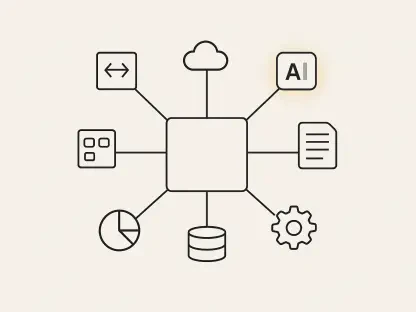
A robust and scalable multimodal system can be organized into a production-ready, four-layer architecture that unifies diverse data streams into coherent, intelligent features. The first layer, Input Modalities, focuses on taming the chaos of raw data. Here, distinct sources like vision, text, and sensor data are isolated behind clean interfaces. Instead of passing unpredictable raw data through the system, this layer publishes structured events, such as an InputEvent, ensuring a consistent and manageable data flow from the outset.
The second layer, the Fusion and Context Layer, acts as the brain of the operation. It aggregates signals from the various input modalities into a single, unified SessionContext. This layer is responsible for implementing fusion strategies, which determine how different data types are combined. An “Early fusion” approach might combine raw signals into a single feature vector before model processing, whereas “Late fusion” runs separate models for each modality and then combines their outputs. This centralizes the logic for creating a holistic understanding of the current user session.
Next, the AI Services Layer executes a hybrid on-device and cloud strategy to balance performance, privacy, and power. On-device AI is leveraged for tasks requiring low latency, offline functionality, and data privacy, such as real-time object detection or text recognition. In contrast, the cloud is reserved for computationally intensive tasks like complex reasoning with large language models (LLMs) or accessing vast knowledge bases. This separation allows for maximum flexibility and efficiency.
Finally, the UX and Orchestration Layer represents the final mile, connecting the AI’s intelligence to the user interface. This is typically managed by ViewModels and UseCases, which orchestrate complex, multi-step AI flows and translate them into a clear UI state. A critical function of this layer is designing a transparent user experience that includes clear feedback mechanisms and provides users with granular control over which data modalities are active, building trust and ensuring user agency.
Lessons from the Trenches: Code, Patterns, and Production Realities
Moving from architectural theory to practical implementation requires battle-tested code patterns that ensure the system is both flexible and robust. A foundational pattern for managing the diverse data streams is the InputEvent sealed class in Kotlin. This approach provides a type-safe and structured way to represent different types of input, from camera frames to user text, making the data flow predictable and easier to manage throughout the system.
sealed class InputEvent {data class VisionFrame(val bitmap: Bitmap, val timestamp: Long) : InputEvent()data class UserText(val text: String, val source: TextSourceType) : InputEvent()data class SensorSnapshot(val datMap, val timestamp: Long) : InputEvent()} Expert insight from production environments underscores the non-negotiable importance of decoupling components for future flexibility. AI services, such as VisionService or LLMService, should always be defined as interfaces rather than concrete implementations. By using dependency injection to provide these services, developers can easily swap between on-device and cloud-based models, A/B test different AI providers, or adapt the application to new, more powerful models as they become available. This practice is essential for future-proofing the application against the rapid evolution of AI technology.
The Pragmatist’s Guide: Managing Performance, Privacy, and Testability
While powerful, multimodal AI is inherently resource-intensive, demanding a pragmatic approach to mitigate its costs. To maintain performance and optimize battery life, developers should prefer event-driven models over constant polling of sensors or the camera. Strategies like coalescing sensor updates into less frequent batches and caching intermediate results, such as object detections or data embeddings, can significantly reduce computational load and create a leaner, more efficient application.
Building user trust requires a privacy-first approach to handling sensitive data. Whenever feasible, raw data from the camera or microphone should be processed on-device to prevent it from ever leaving the user’s control. When cloud processing is necessary, only abstracted features or anonymized data should be transmitted. Furthermore, providing users with clear, easily accessible opt-outs for specific modalities, like camera or location access, empowers them and fosters a sense of security and control over their personal information.
Finally, a comprehensive testing and observability framework is essential for ensuring sanity in such a complex system. A three-tiered testing strategy is recommended: unit tests to validate individual modality adapters, integration tests to verify the logic of the fusion engine, and end-to-end tests to validate complete user flows. This should be supplemented with structured telemetry that logs anonymized inputs, model calls, and user actions. This data becomes invaluable for debugging vague user reports like “it felt weird” and provides the insights needed to continuously improve the system’s intelligence and reliability.
The architectural blueprint and practical strategies outlined here provided a clear path toward building sophisticated, maintainable, and user-centric multimodal AI on Android. By moving beyond isolated features and designing for holistic context, developers created applications that were not just smarter but more intuitive and genuinely helpful. This methodical approach to managing inputs, fusing context, and orchestrating AI services ensured that the next wave of mobile intelligence was built on a foundation of robustness, privacy, and performance.