
Connecting sophisticated AI applications to diverse, proprietary data sources has quickly become one of the most significant bottlenecks in modern software development, often leading to a complex web of brittle, custom-built integrations. This challenge underscores the critical need for a standardized communication layer, a universal translator that allows any AI model to seamlessly and securely interact with any external system. The Model Context Protocol (MCP) has emerged as this definitive standard, and with the maturation of its official Go SDK, developers now have a powerful, type-safe framework for building high-performance AI database tools. This guide outlines the essential best practices for leveraging Go and MCP to construct robust, reusable, and universally compatible AI tooling, using a practical Azure Cosmos DB server as a guiding example.
An Introduction to the Model Context Protocol and the Go SDK
Before diving into implementation specifics, it is essential to grasp the foundational concepts of MCP and the role of the Go SDK. Understanding this context is the first step toward building effective and maintainable AI tools. The protocol itself provides the rules of engagement, while the SDK supplies the building blocks for Go developers.
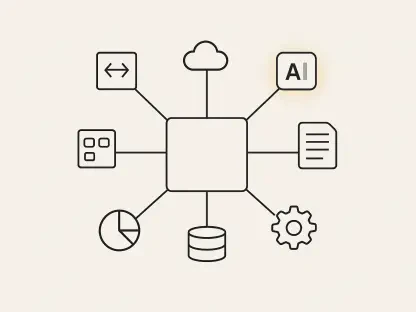
MCP is best understood as the “USB-C port” for AI applications. Just as USB-C created a universal standard for power and data transfer across countless devices, MCP establishes an open-source, standardized protocol for connecting AI applications to external systems. This elegant abstraction removes the need for bespoke integrations for every new data source, tool, or workflow.
For developers in the Go ecosystem, the arrival and subsequent stabilization of the official MCP Go SDK represents a pivotal moment. The SDK provides the core components and abstractions necessary to create MCP-compliant servers and clients, allowing Gophers to build performant, concurrent, and reliable AI tooling using the language’s strengths. It handles the low-level complexities of the protocol, enabling developers to focus on the business logic of their tools.
The primary goal of this guide is to provide a clear, step-by-step methodology for building a practical MCP server. By following the development of an Azure Cosmos DB toolset, developers will learn the best practices for defining tool interfaces, implementing handler logic, configuring server transports, and writing comprehensive integration tests, culminating in a blueprint for creating any database-backed AI tool.
Why MCP is a Game-Changer for AI Tooling
The rapid proliferation of AI has created a highly fragmented landscape where every new application and data source requires a custom-coded bridge. This approach is not scalable and leads to immense technical debt. MCP directly addresses this chaos by introducing a common language that all participants can speak, fundamentally changing how AI tools are built and consumed.
The core benefits of adopting MCP are universal compatibility, reusability, and simplified integrations. When a tool is exposed via an MCP server, it immediately becomes accessible to any MCP-compliant client, from IDEs and CLI assistants to large-scale AI applications. This “build once, use everywhere” paradigm drastically reduces development overhead and accelerates innovation. Consequently, integrations that once took weeks of custom work can now be accomplished through a simple, standardized connection.
Ultimately, MCP empowers AI applications to safely and effectively interact with the world beyond their training data. Whether accessing a relational database, querying a document store, calling a third-party API, or executing a complex multi-step workflow, MCP provides the secure and structured channel for these interactions. This capability transforms AI from a passive knowledge repository into an active agent capable of performing meaningful work.
A Step-by-Step Guide to Building Your MCP Server
Constructing an MCP server is a methodical process that involves defining capabilities, implementing logic, and configuring communication. Following a structured approach ensures that the final product is not only functional but also robust, testable, and compliant with the protocol standard.
Step 1: Defining MCP Tools as Building Blocks
The foundation of any MCP server is its collection of tools. A tool is a single, well-defined capability exposed to the AI application. Proper definition is crucial, as it serves as the contract between the server and the client, informing the AI what the tool does and how to use it correctly.
The core components of an MCP tool are its definition, inputs, and outputs. The definition includes a unique name and a clear, concise description that an AI model can understand and use to determine when the tool is appropriate for a given task. The inputs and outputs define the data structure for requests and responses, forming a strict, type-safe interface.
In Go, the best practice is to leverage structs with JSON schema tags to define these interfaces. This approach allows the MCP Go SDK to automatically generate the necessary JSON schemas for protocol communication, handle data validation, and provide strong compile-time guarantees. The use of jsonschema tags to add descriptions to individual fields further enhances the AI’s ability to correctly format its requests.
Real-World Example: Defining the read_item Tool for Cosmos DB
To illustrate, consider a read_item tool for Azure Cosmos DB. The tool definition would specify its name and a description like, “Reads a single item from a specified Cosmos DB container using its ID and partition key.” The input struct would contain fields for DatabaseName, ContainerName, ItemID, and PartitionKey, each with descriptive jsonschema tags. The output struct would simply hold the retrieved item as a generic map[string]interface{}, allowing for flexible data shapes. This clear and explicit definition ensures predictable and reliable interactions.
Step 2: Implementing Tool Handlers for Core Logic
With a tool’s interface defined, the next step is to implement its core logic within a handler function. The handler is the bridge between the standardized MCP world and the specific logic of the external service being integrated. It is responsible for receiving validated input, performing the required operations, and returning a structured output.
A well-structured handler function should bind directly to the tool’s definition. The MCP Go SDK facilitates this with a generic AddTool function that accepts a handler with a specific signature, typically func(context.Context, InputType) (OutputType, error). This signature ensures that the SDK can manage the full lifecycle of a tool call, from deserializing the request to serializing the response or handling errors.
The handler’s implementation should cleanly separate concerns. Its primary responsibilities are to validate inputs beyond basic type checking, orchestrate calls to external services—such as the Azure Cosmos DB Go SDK—and format the data for the structured output. Any complex business logic or interaction with external clients should be encapsulated within the handler, keeping the server’s main configuration lean and focused on routing.
Case Study: The read_item Handler and Azure Authentication
In the read_item handler for Cosmos DB, the logic begins by receiving the validated input struct. It then uses the Azure Identity SDK’s NewDefaultAzureCredential to seamlessly handle authentication, a best practice that supports multiple credential sources from local development environments to production deployments. Using the authenticated client, the handler interacts with the Azure Cosmos DB Go SDK to get a container client and execute the ReadItem operation. The result is then returned, and the MCP SDK automatically marshals it into the correct response format or, if an error occurred, signals a failure to the AI client.
Step 3: Assembling and Configuring the MCP Server
Once individual tools and their handlers are implemented, they must be assembled and registered with a central MCP server instance. This server acts as the main entry point for all client communications, advertising its available capabilities and routing incoming requests to the appropriate handlers.
The process begins by instantiating the server using mcp.NewServer(). This function requires essential implementation metadata, such as a name and version, which helps clients identify the server. It also accepts server options for more advanced configurations, though default settings are often sufficient to start.
After creating the server instance, each tool must be registered using the mcp.AddTool() function. This function links the tool’s definition struct with its corresponding handler function. Registering multiple tools effectively builds the server’s public API, exposing its full suite of capabilities to any connected AI application. When a client connects, the server automatically advertises these registered tools.
Code Example: Bringing All Tools Together in main.go
In a typical main.go file, the server setup involves creating the server instance and then making a series of mcp.AddTool() calls. For the Cosmos DB server, this would include registering read_item, execute_query, list_databases, and other implemented tools. Each call pairs a tool definition function, like tools.ReadItem(), with its handler, tools.ReadItemToolHandler. This centralized registration in the main application setup provides a clear and consolidated view of all functionalities the server offers.
Step 4: Choosing the Right Communication Transport
A transport is the communication channel that carries messages between the MCP client and server. The MCP Go SDK abstracts this layer, allowing developers to choose the appropriate transport mechanism for their specific use case without altering the core tool logic. The choice of transport dictates how the server is deployed and how clients connect to it.
The transport layer is responsible for handling the low-level details of communication, such as establishing connections and streaming JSON-RPC messages that conform to the MCP specification. Because the server’s business logic is decoupled from the transport, the same set of tools can be exposed over different channels simultaneously, maximizing flexibility.
The two most common transports are stdio and HTTP. The stdio transport is designed for local tools where the MCP server runs as a subprocess managed by the client application, communicating over standard input and output streams. In contrast, the HTTP transport exposes the server over a network, making it accessible to web-based AI applications or services running in different environments. It is ideal for scenarios requiring concurrent client sessions and network accessibility.
Implementation: Using Stdio Transport for Local CLI Tools
To implement the stdio transport, one simply passes mcp.StdioTransport to the server’s Serve method. This configuration is perfect for tools intended to be used with local clients like developer CLIs or desktop applications. The client application is responsible for launching the server process and managing its lifecycle, creating a tightly integrated local tooling experience.
Implementation: Using HTTP Transport for Web-Based AI Applications
For web-based applications, the mcp.NewStreamableHTTPHandler creates an HTTP handler that can be attached to a standard Go HTTP server. This handler manages the streamable transport protocol automatically, supporting multiple concurrent client sessions over HTTP/HTTPS. This approach is the standard for building MCP servers that need to be accessible as standalone, networked services.
Step 5: Writing Robust Integration Tests
Thorough testing is non-negotiable for building reliable AI tools. A robust testing strategy for an MCP server must verify functionality at multiple levels, ensuring not only that the handler logic is correct but also that the server fully complies with the MCP protocol. This requires a two-pronged approach that combines handler-level unit tests with end-to-end protocol tests.
The role of an MCP client is central to a testing environment. While in production the client is an AI application, in testing, a programmatic client is created to simulate real interactions. The MCP Go SDK provides a Client type that can connect to the server and invoke its tools, allowing tests to verify the complete request-response cycle just as a real application would.
A comprehensive test suite validates every layer of the stack. Handler-level tests isolate business logic, while end-to-end tests confirm that serialization, transport, and protocol handling are all functioning correctly. This dual strategy provides high confidence in the server’s correctness and stability.
Strategy 1: Handler-Level Testing with the Azure Cosmos DB Emulator
For handler-level testing, the best practice is to call handler functions directly, bypassing the MCP protocol layer, and to interact with a real or emulated downstream service. Using the Azure Cosmos DB vNext Emulator with a library like testcontainers-go allows tests to verify database interactions against a realistic environment without mocking. This approach validates business logic, error handling, and database operations under authentic conditions.
Strategy 2: End-to-End Protocol Testing with In-Memory Transports
To validate the full protocol stack, end-to-end tests should be written using a real MCP client and server connected via an in-memory transport. The mcp.NewInMemoryTransports() function creates a connected pair of transports that operate without actual network I/O, making them ideal for fast and reliable integration tests. These tests instantiate a client, connect it to the server, call a tool with sample data, and assert that the response is correctly serialized, transported, and parsed. This strategy verifies complete protocol compliance from client request to server response.
Final Thoughts and Your Path Forward
This guide detailed the best practices for combining the MCP Go SDK with domain-specific libraries to create powerful AI tooling. The patterns covered—from defining type-safe tools and implementing focused handlers to selecting the right transport and writing multi-layered integration tests—provided a repeatable blueprint for building any MCP server in Go. The Azure Cosmos DB server served as a practical example, but the principles are universally applicable, whether the goal is to expose a database, an API, or a custom workflow.
Go developers who are tasked with integrating backend systems and data sources into the AI ecosystem benefit most from building MCP servers. The language’s strengths in concurrency, performance, and static typing make it an excellent choice for creating scalable and reliable services that can handle the demands of modern AI applications. This approach allows organizations to leverage their existing Go expertise to unlock their data for AI consumption.
The path forward involved applying these best practices to new domains. Developers were encouraged to explore the official MCP Go SDK documentation and the MCP specification to deepen their understanding. By building on these foundations, they could create a new class of standardized, reusable, and powerful AI tools, accelerating innovation and bridging the gap between artificial intelligence and real-world data.